WhatsApp translator
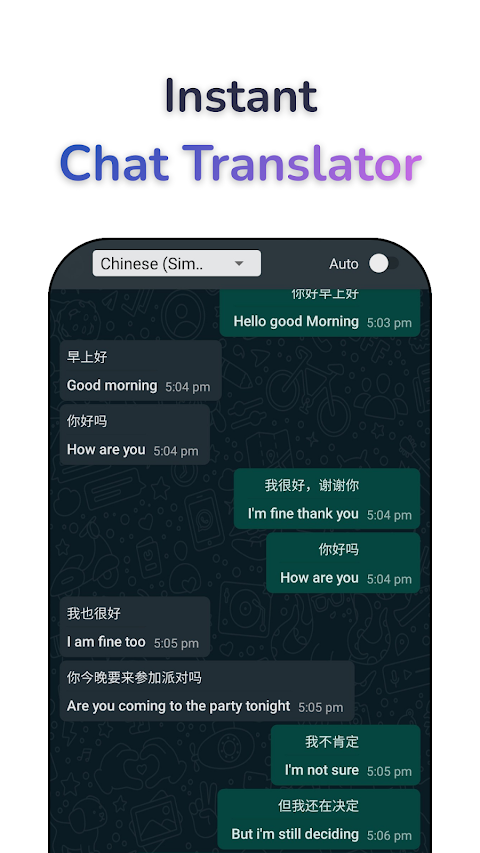
You type in your language; the other person reads in theirs.

How it works
Swift Translate translates WhatsApp messages inside the chat — and translates your replies before they are sent. You type in your language; the other person reads in theirs. It translates 3.7 million WhatsApp messages every month.
- Install Swift Translate and turn the translator on — a floating bubble appears.
- Open WhatsApp and drag the bubble over any message to read it in your language.
- To reply, type in your language in the chat box — Swift Translate converts it before you send.
Reply in any language
Most translator apps only help you read. Replying is the hard part: copy, switch apps, paste, switch back. Swift Translate's reply mode removes all of that — type in your language, drag the bubble onto your text, and the message is sent in theirs.
Who uses it
-
Couples
Talk naturally, even without a shared language.
-
WhatsApp Business
Answer customers in any country. Sellers translate 2 million Business messages a month.
-
Family groups
Follow every message, in every language.
-
Group chats
Take part in mixed-language groups instead of just watching.
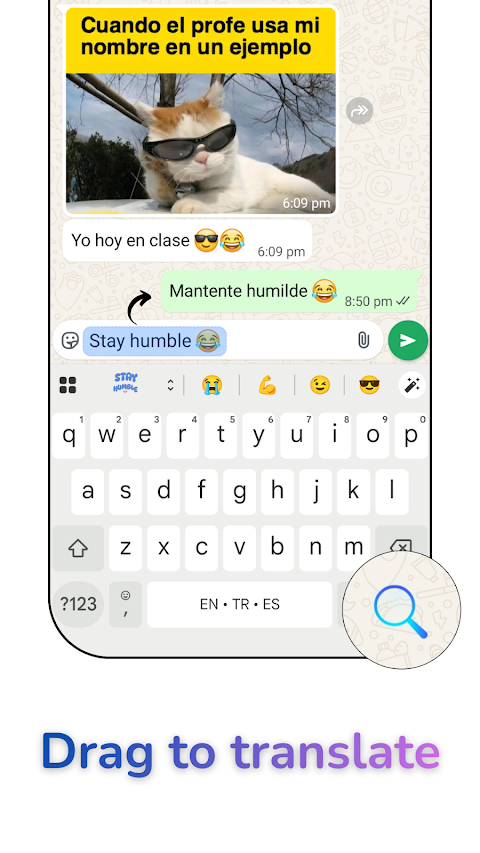
Translate your replies from the keyboard
Swift Translate Keyboard, for iPhone and Android, works right in WhatsApp: write your reply in your language, tap Translate, and send it in theirs. To read a message, copy it and tap once on the keyboard.
Common questions
How do I translate WhatsApp messages automatically?
Install Swift Translate, enable the translator, and open WhatsApp. Chat Mode can translate incoming messages automatically as they arrive, or you can drag the floating bubble over any message. Replies you type in your language are sent in theirs.
Does WhatsApp have a built-in translator?
Yes. WhatsApp has its own Translate: press and hold a message and choose Translate. On Android it can also translate new messages in a chat automatically. It doesn’t translate your replies, it isn’t in WhatsApp Business, and its list of languages is limited. Swift Translate covers those gaps: it translates any message on your screen in 100+ languages, sends your replies in their language, and its Chat Mode works in WhatsApp and WhatsApp Business. See how to translate WhatsApp messages, step by step.
Does it work with WhatsApp Business?
Yes — WhatsApp Business is fully supported, and it is one of the most popular uses of Swift Translate for sellers talking to international customers.
Is it safe? Can the app read my chats?
The app reads your screen through Android’s accessibility service, only while you use it. Swift Translate does not collect, store, or share your messages — see the privacy policy.
Translate your next message
Download it for your phone. All download options